Integrate InsightFace Server REST API and Python SDK
Integrate InsightFace Server with its REST API or Python SDK: create Collections, enroll identities, run exact 1:N search, retry safely, and monitor RTSP.
What you will build
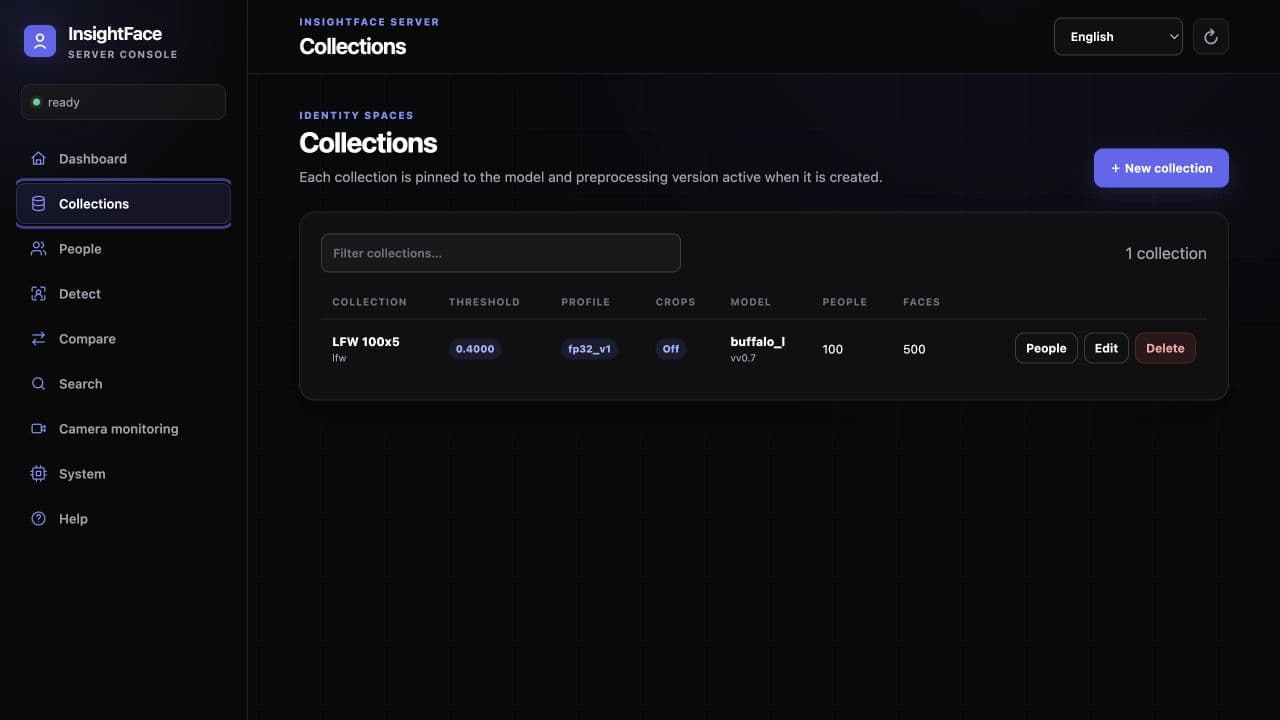
InsightFace Server is a self-hosted face analysis and recognition service. Its Web UI, versioned /v1 REST API, and lightweight Python SDK operate on the same Collections, People, FaceSamples, and persistent camera monitors.
This guide starts at the API boundary and follows one complete integration: verify authentication and readiness, create a Collection, enroll a Person, search for that Person, call stateless Detect and Compare, then connect an RTSP monitor. It also highlights the retry, biometric-data, model-license, and network controls that matter outside an isolated evaluation environment.
Before you start
- A running CPU server at http://127.0.0.1:18097, or a CUDA server at the configured address (the bundled CUDA example uses port 18098).
- JPEG, PNG, WebP, or BMP test images with consent and a clear face; the default compressed-image limit is 10 MiB.
- The API key if authentication is enabled, plus shell access for curl and Python 3 for the optional SDK workflow.
- A licensed and verified model package. Public InsightFace pretrained models are limited to non-commercial research unless you have a separate commercial license.
1. Confirm authentication and the response contract
Call GET /v1/health first. It is always public and reports both readiness and auth_enabled. When auth_enabled is true, every other endpoint requires Authorization: Bearer <api_key>. When authentication is disabled, omit the Authorization header completely—do not send an empty header. The first command block shows that exact unauthenticated form; the second is for authenticated deployments.
The API uses snake_case JSON and multipart/form-data for images. Every response has an x-request-id UUID header, and JSON bodies repeat it as request_id. Detection and quality signals use 0.0–1.0, but recognition similarity is the raw cosine value in [-1.0, 1.0], not a probability. Threshold accepts the inclusive range [0.0, 1.0], defaults to 0.4, and a match means similarity >= threshold.
- A successful DELETE returns HTTP 204 with no body.
- No detected face may be a valid empty Detect result; no Search match is a valid matches: [] result.
- OpenAPI is available at /openapi.json and the same-origin interactive viewer at /docs.
BASE_URL=http://127.0.0.1:18097
curl -fsS "${BASE_URL}/v1/health"
curl -sS "${BASE_URL}/v1/system"export INSIGHTFACE_API_KEY='replace-with-a-long-random-secret'
BASE_URL=http://127.0.0.1:18097
AUTH_HEADER="Authorization: Bearer ${INSIGHTFACE_API_KEY}"
curl -fsS "${BASE_URL}/v1/health"
curl -sS "${BASE_URL}/v1/system" -H "${AUTH_HEADER}"2. Create a Collection and pin the contract
A Collection binds the recognition model, bundle digest, embedding dimension, preprocessing, detection, and search settings. Responses identify models with model_id and omit model_version. Use the returned embedding_contract_id unchanged for Collection compatibility and trusted external enrollment; never construct it yourself.
Start with threshold 0.4, then calibrate it on representative validation data. Collection responses expose a detection_revision and resolved search settings. Later detection-profile changes apply to new requests but do not re-extract existing FaceSamples. Search profiles are exact flat searches; lower-precision profiles approximate FP32 cosine values but are not ANN indexes.
- The overall default search profile is fp32_v1; fp16_v1 is CUDA-only, while BF16 support depends on CPU capability or SM80+ CUDA.
- Default capacity is 100,000 live rows and max_faces_per_person is 20; size these from a real memory and retention budget.
- Face-crop storage is off by default. If enabled, the server stores 112×112 bounding-box JPEG crops, not original uploads or aligned recognition inputs.
curl -sS "${BASE_URL}/v1/collections" -H "${AUTH_HEADER}" \
  -H 'Content-Type: application/json' \
  -d '{"id":"employees","name":"Employees","threshold":0.4}'
3. Enroll a Person, then search
Enrollment is multipart and can accept several images in one request. review_mode=off follows the Collection face-selection strategy; standard requires exactly one usable face and applies configured size, confidence, quality, and pose checks; strict adds within-person versus outside-person similarity checks. A batch may partially succeed with HTTP 201, so always inspect both faces and rejected_images.
Search selects one query face with the Collection profile, compares it with every live FaceSample, assigns each Person that Person's highest sample score, and returns only scores at or above the effective threshold. Results are ordered by similarity. Use a different image from enrollment when validating the flow.
- A missing query face is 422 face_not_found; a valid query with no identity above threshold returns matches: [].
- Accepted samples are committed to SQLite and added to the active in-memory index before a successful response.
- external_trusted enrollment still requires the paired image and exact embedding_contract_id; vectors must be finite, correctly sized, nonzero, and L2-normalized within 1.0 ± 0.0002.
curl -sS "${BASE_URL}/v1/collections/employees/persons" \
  -H "${AUTH_HEADER}" \
  -F 'id=employee-001' \
  -F 'name=Alice' \
  -F 'external_id=HR-1001' \
  -F 'metadata={"department":"sales"}' \
  -F 'review_mode=standard' \
  -F 'images=@alice1.jpg' \
-F 'images=@alice2.jpg'curl -sS "${BASE_URL}/v1/collections/employees/search" \
-H "${AUTH_HEADER}" \
-F 'image=@alice-query.jpg' \
-F 'limit=5'4. Use stateless Detect and Compare
Detect returns all usable faces in descending area order, including pixel and normalized boxes, five landmarks, detector confidence, and local quality signals. It returns neither embeddings nor persisted data. Pass collection_id when you want that Collection's detection profile instead of the immutable system profile.
Compare selects one face from source and target, computes raw cosine similarity, and returns matched using the effective threshold. Similarity can be negative and must never be shown as a confidence percentage. If either image has no usable face, Compare returns 422 face_not_found.
- JPEG, PNG, WebP, and BMP are supported. EXIF orientation is applied before inference; max_faces accepts 1–100.
- The default whole-request limit is 64 MiB and decoded-image limit is 40 million pixels.
- Detect, Compare, enrollment, Search, embeddings, and RTSP recognition share the process-wide inference concurrency budget.
curl -sS "${BASE_URL}/v1/detect" \
  -H "${AUTH_HEADER}" \
  -F 'image=@group.jpg' \
  -F 'max_faces=10' \
-F 'collection_id=employees'curl -sS "${BASE_URL}/v1/compare" \
-H "${AUTH_HEADER}" \
-F 'source=@source.jpg' \
-F 'target=@target.jpg' \
-F 'threshold=0.4'5. Use the lightweight Python SDK
Install the client directly from this checkout. It uses httpx and contains no inference runtime. It accepts image paths, bytes, or binary file-like objects and waits up to 65 seconds by default, slightly longer than the server's 60-second request deadline.
The example uses the user-guide CPU address on port 18097 and an authenticated server. When authentication is disabled, construct Client("http://localhost:18097") without api_key so no Authorization header is sent. The same client also exposes create_monitor, update_monitor, monitor_state, and cursor-based monitor_events.
- Keep the client timeout longer than the configured server request timeout unless your application intentionally fails earlier.
- Pass collection= to Detect or Compare when you need a Collection detection profile.
- Close the client or use it as a context manager so pooled connections are released.
python -m pip install ./server/sdk/pythonfrom insightface_server import Client
# Authenticated deployment. When authentication is disabled, omit api_key:
# with Client("http://localhost:18097") as client:
with Client("http://localhost:18097", api_key="your-key") as client:
client.create_collection(
collection_id="employees",
name="Employees",
threshold=0.4,
)
client.add_person(
"employees",
person_id="employee-001",
name="Alice",
images=["alice1.jpg", "alice2.jpg"],
review_mode="standard",
)
faces = client.detect("group.jpg", max_faces=10, collection="employees")
comparison = client.compare(
"source.jpg", "target.jpg", threshold=0.4, collection="employees"
)
matches = client.search("employees", "alice-query.jpg", limit=5)
print(faces.faces)
print(comparison.similarity, comparison.matched)
print(matches.matches)6. Handle errors and retries without duplicating biometric writes
Errors use one JSON envelope with error.code, error.message, optional details, and request_id. Common mappings are 400 for invalid parameters, 401 for a missing or invalid key, 404 for a missing resource, 409 for state or model conflicts, 413 for size limits, 422 for an invalid image or unusable face, 500 for an unexpected error, and 503 for timeout or runtime/index unavailability.
GET is safe to retry. Retry 429 and transient 503 with bounded exponential backoff and jitter; validation 4xx responses require changing the request. Treat Person or FaceSample creation as ambiguous after a transport failure: first read the client-supplied resource ID. If a registration 503 includes write_committed: true, SQLite already contains the write, so do not blindly retry—read the Person before deciding what to do.
With liveness enabled, Detect returns per-face liveness results. In normal mode, Compare and Search return HTTP 422 liveness_fake or liveness_input_rejected when blocked, with error.details.liveness; Compare also identifies error.details.side. This is different from a successful empty match list. Runtime failures return HTTP 503 liveness_unavailable in both normal and observe modes.
Read status, is_live, and live_score. Only input_rejected adds the English reason text; use status and is_live in program logic. Results omit liveness when it was not run. Enrollment skips liveness by default; liveness_on_registration=true enables the configured policy, and a batch may partially succeed.
- Log x-request-id, endpoint, status, and safe timing data; do not log images, embeddings, API keys, or RTSP credentials.
- Retry DELETE only after reading current state.
- Opaque pagination and event cursors must be reused unchanged with the same endpoint and filters; never parse or synthesize them.
7. Add a persistent RTSP monitor
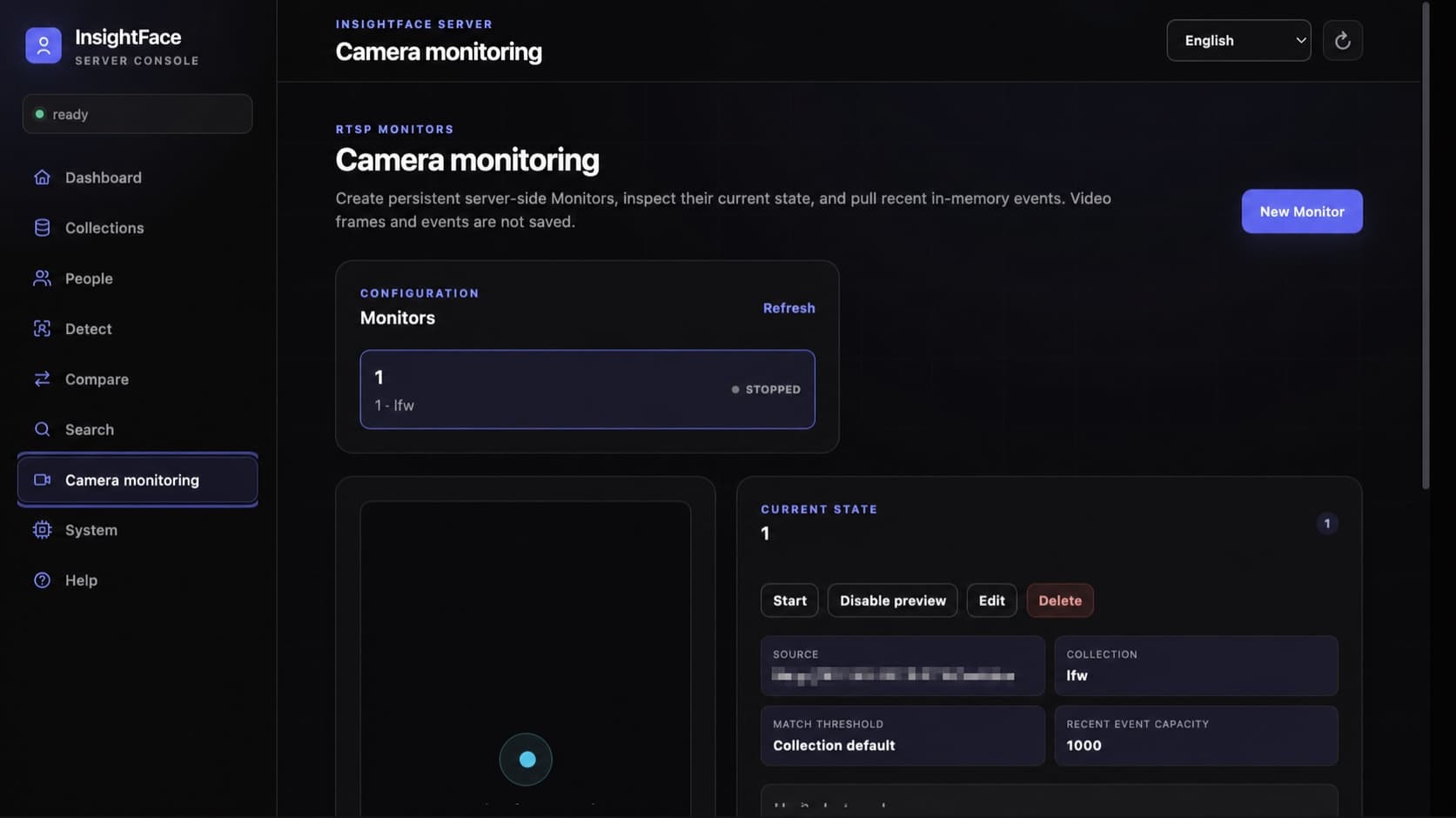
A Monitor is a server-side RTSP recognition task whose configuration is stored in SQLite. An enabled task resumes after Server restart and keeps running when the browser closes. The decoder retains only the newest frame, so slow inference lowers the effective rate instead of creating a stale queue. match_threshold: null inherits the Collection threshold.
Preview is deliberately off by default and recognition does not depend on it. When enabled, /preview.mjpeg streams raw, unannotated JPEG frames; clients use /state to draw boxes. Never put an API key in the preview URL. Poll /events with its opaque cursor for enter, exit, error, and recovery events, and handle truncated or stream_reset explicitly.
- RTSP credentials are AES-GCM encrypted under /data and are returned only in redacted form.
- Video frames are never saved. Recent events live in a bounded in-memory ring and are lost when the process restarts.
- Restrict Monitor administration to trusted operators; phase one has one undifferentiated API key, not tenant-level authorization.
{
  "id": "front-gate",
  "name": "Front gate",
  "description": "Main entrance",
  "enabled": true,
  "source": {
    "type": "rtsp",
    "url": "rtsp://viewer:secret@camera.example/live"
  },
  "collection_id": "employees",
  "inference_fps": 2.0,
  "match_threshold": null,
  "event_buffer_size": 1000,
  "event_policy": {
    "confirm_frames": 3,
    "absence_timeout_seconds": 3.0,
    "cooldown_seconds": 10.0,
    "emit_unknown": true
  },
  "preview_enabled": false
}curl -sS "${BASE_URL}/v1/monitors" -H "${AUTH_HEADER}" \
-H 'Content-Type: application/json' \
-d @monitor.json
curl -sS "${BASE_URL}/v1/monitors/front-gate/state" \
-H "${AUTH_HEADER}"
curl -sS "${BASE_URL}/v1/monitors/front-gate/events?limit=100" \
-H "${AUTH_HEADER}"8. Protect data, networking, backups, and model rights
Persist /data, models, and server/config. Back up SQLite and configured face crops together while writes are stopped, or use a SQLite-safe snapshot. Protect these paths and backups as biometric data. Enable API-key authentication and HTTPS before network exposure.
The Server source and Python SDK are MIT-licensed; models are expressly not covered by that license. The container image does not include models. The installer displays the model license and verify checks the package identity, signed license, validity dates, and current authorization. Public InsightFace model packages—including buffalo_l—are generally limited to non-commercial academic research unless a separate commercial license has been issued. Code availability or a successful model download is not commercial deployment permission.
The supplied containers run as root (0:0), with one writable /models mount and a writable configuration directory. Compose creates the model root, and addon installation creates addons/ as needed. No host UID/GID or manual permission setup is required. The container root filesystem remains read-only.
- API keys are stored as hashes; changing INSIGHTFACE_API_KEY on a later start intentionally rotates the active key for that data volume.
- Use docker compose down without -v. Adding -v permanently deletes the named data volume.
- Define consent, retention, deletion, incident response, and authorized-use policies before processing production identities.
docker compose -f server/deploy/compose.cpu.yml \
  run --rm models install buffalo_l --accept-license
docker compose -f server/deploy/compose.cpu.yml \
  run --rm models verify buffalo_l
Need help with production deployment?
Contact InsightFace for model licensing, runtime optimization, and deployment support for your target hardware.
Submit Enterprise Inquiry