InsightFace Server REST API 및 Python SDK 통합
REST API 또는 Python SDK로 Collection 생성, 신원 등록, 정확한 1:N 검색, 안전한 재시도, 영구 RTSP 모니터링까지 구현합니다.
이 가이드에서 구축할 내용
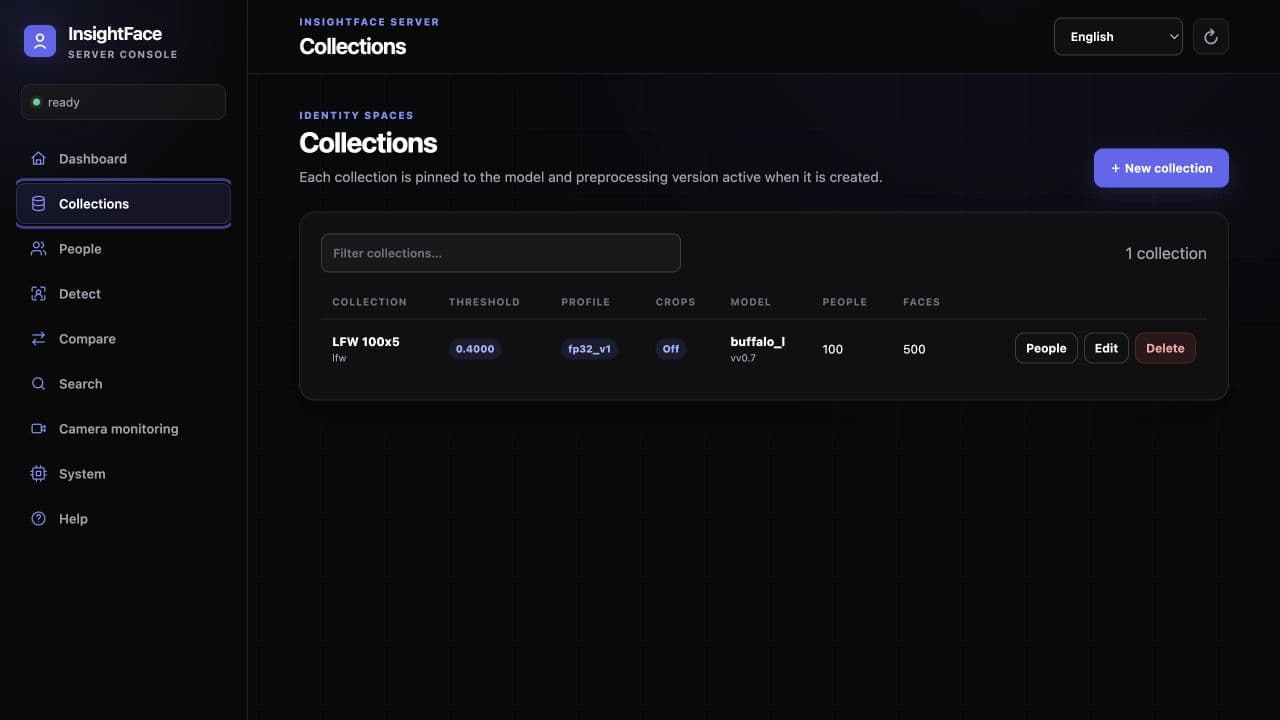
InsightFace Server는 자체 호스팅 방식의 얼굴 분석·인식 서비스입니다. Web UI, 버전이 지정된 /v1 REST API, 경량 Python SDK는 동일한 Collection, Person, FaceSample, 영구 카메라 Monitor를 다룹니다.
이 가이드는 API 경계에서 시작해 전체 통합 흐름을 완성합니다. 인증과 준비 상태 확인, Collection 생성, Person 등록과 검색, 상태 비저장 Detect·Compare 호출, RTSP Monitor 연결을 다루며, 격리된 평가 환경 밖에서 필요한 재시도, 생체 데이터, 모델 라이선스, 네트워크 통제도 설명합니다.
시작하기 전에
- http://127.0.0.1:18097에서 실행 중인 CPU Server 또는 설정된 CUDA Server 주소. 제공된 CUDA 예시는 18098 포트를 사용합니다.
- 적법한 동의를 받아 수집하고 선명한 얼굴이 포함된 JPEG, PNG 또는 WebP, BMP 테스트 이미지. 압축 이미지 기본 한도는 10 MiB입니다.
- 인증이 켜진 경우 API key, curl을 실행할 shell, 선택적인 SDK 흐름을 위한 Python 3.
- 라이선스가 있고 검증된 model package. 별도 상업 라이선스가 없으면 공개 InsightFace pretrained model은 비상업 연구로 제한됩니다.
1. 인증 상태와 응답 계약 확인
먼저 GET /v1/health를 호출합니다. 이 endpoint는 항상 공개되며 readiness와 auth_enabled를 함께 알려 줍니다. auth_enabled가 true이면 그 외 모든 endpoint에 Authorization: Bearer <api_key>가 필요합니다. 인증이 꺼져 있으면 Authorization header를 완전히 생략해야 하며 빈 header도 보내면 안 됩니다. 첫 번째 명령 블록이 정확한 무인증 형식이고, 두 번째는 인증된 deployment용입니다.
API는 snake_case JSON을 사용하고 이미지는 multipart/form-data로 받습니다. 모든 응답에는 UUID x-request-id header가 있고 JSON body에도 request_id로 반복됩니다. Detection과 품질 신호는 0.0–1.0이지만 recognition similarity는 [-1.0, 1.0] 범위의 raw cosine이며 확률이 아닙니다. threshold는 닫힌 구간 [0.0, 1.0]을 허용하고 기본값은 0.4이며 similarity >= threshold일 때 match입니다.
- 성공한 DELETE는 body 없이 HTTP 204를 반환합니다.
- 얼굴이 없는 Detect는 정상적인 빈 결과일 수 있고, Search 미일치는 정상적인 matches: []입니다.
- OpenAPI는 /openapi.json, same-origin 대화형 viewer는 /docs에 있습니다.
BASE_URL=http://127.0.0.1:18097
curl -fsS "${BASE_URL}/v1/health"
curl -sS "${BASE_URL}/v1/system"export INSIGHTFACE_API_KEY='replace-with-a-long-random-secret'
BASE_URL=http://127.0.0.1:18097
AUTH_HEADER="Authorization: Bearer ${INSIGHTFACE_API_KEY}"
curl -fsS "${BASE_URL}/v1/health"
curl -sS "${BASE_URL}/v1/system" -H "${AUTH_HEADER}"2. Collection을 만들고 계약 고정
Collection은 인식 모델, bundle digest, embedding 차원, 전처리, 검출 및 검색 설정을 고정합니다. 응답은 model_id를 사용하고 model_version은 반환하지 않습니다. 호환성 확인과 신뢰된 외부 등록에는 반환된 embedding_contract_id를 그대로 사용하고 직접 만들지 마세요.
threshold 0.4에서 시작해 대표성 있는 validation data로 보정하세요. Collection 응답은 detection_revision과 최종 search 설정을 노출합니다. 이후 detection profile 변경은 새 request에만 적용되고 기존 FaceSample을 재추출하지 않습니다. Search profile은 모두 정확한 전수 선형 검색이며 저정밀 profile은 FP32 cosine을 근사하지만 ANN index는 아닙니다.
- 전체 기본 search profile은 fp32_v1입니다. fp16_v1은 CUDA 전용이고 BF16은 CPU 지원 또는 SM80+ CUDA가 필요합니다.
- 기본 capacity는 active row 100,000개, max_faces_per_person은 20입니다. 실제 메모리와 보존 예산으로 정하세요.
- Face crop 저장은 기본적으로 꺼져 있습니다. 켜도 112×112 bounding-box JPEG crop만 저장하며 원본 upload나 aligned recognition input은 저장하지 않습니다.
curl -sS "${BASE_URL}/v1/collections" -H "${AUTH_HEADER}" \
  -H 'Content-Type: application/json' \
  -d '{"id":"employees","name":"Employees","threshold":0.4}'
3. Person 등록 후 검색
Enrollment는 multipart이며 한 request에 여러 이미지를 받을 수 있습니다. review_mode=off는 Collection의 얼굴 선택 전략을 따르고, standard는 사용 가능한 얼굴이 정확히 하나인지 확인한 뒤 설정된 크기·confidence·품질·pose 검사를 적용하며, strict는 동일 Person 내부와 외부의 similarity 비교를 추가합니다. Batch는 HTTP 201로 일부 성공할 수 있으므로 faces와 rejected_images를 모두 확인해야 합니다.
Search는 Collection profile로 query face 하나를 선택해 모든 active FaceSample과 비교하고, Person마다 해당 samples 중 최고 score를 사용합니다. Effective threshold 이상만 similarity 내림차순으로 반환합니다. 흐름을 검증할 때는 등록 이미지와 다른 query 이미지를 사용하세요.
- 사용 가능한 query face가 없으면 422 face_not_found이고, 유효한 query에 임계값 이상 신원이 없으면 matches: []입니다.
- 승인된 sample은 성공 응답 전에 SQLite에 commit되고 active in-memory index에 추가됩니다.
- external_trusted도 짝이 맞는 이미지와 정확한 embedding_contract_id가 필요합니다. Vector는 유한하고 0이 아니며 차원이 맞고 L2 norm이 1.0 ± 0.0002여야 합니다.
curl -sS "${BASE_URL}/v1/collections/employees/persons" \
  -H "${AUTH_HEADER}" \
  -F 'id=employee-001' \
  -F 'name=Alice' \
  -F 'external_id=HR-1001' \
  -F 'metadata={"department":"sales"}' \
  -F 'review_mode=standard' \
  -F 'images=@alice1.jpg' \
-F 'images=@alice2.jpg'curl -sS "${BASE_URL}/v1/collections/employees/search" \
-H "${AUTH_HEADER}" \
-F 'image=@alice-query.jpg' \
-F 'limit=5'4. 상태 비저장 Detect와 Compare 사용
Detect는 사용 가능한 얼굴을 면적 내림차순으로 반환하며 pixel/normalized box, 다섯 landmarks, detector confidence, 로컬 품질 신호를 포함합니다. Embedding을 반환하거나 데이터를 저장하지 않습니다. 변경 불가능한 system profile 대신 특정 Collection detection profile을 쓰려면 collection_id를 전달하세요.
Compare는 source와 target에서 얼굴 하나씩을 선택해 raw cosine similarity를 계산하고 effective threshold에 따른 matched를 반환합니다. Similarity는 음수일 수 있으며 confidence percentage로 표시하면 안 됩니다. 어느 한 이미지에 사용 가능한 얼굴이 없으면 422 face_not_found입니다.
- JPEG, PNG, WebP, BMP를 지원합니다. 추론 전에 EXIF 방향을 적용하며 max_faces는 1–100을 허용합니다.
- 전체 request 기본 한도는 64 MiB, decoded image 한도는 4천만 pixels입니다.
- Detect, Compare, enrollment, Search, embeddings, RTSP recognition은 process-wide inference concurrency budget을 공유합니다.
curl -sS "${BASE_URL}/v1/detect" \
  -H "${AUTH_HEADER}" \
  -F 'image=@group.jpg' \
  -F 'max_faces=10' \
-F 'collection_id=employees'curl -sS "${BASE_URL}/v1/compare" \
-H "${AUTH_HEADER}" \
-F 'source=@source.jpg' \
-F 'target=@target.jpg' \
-F 'threshold=0.4'5. 경량 Python SDK 사용
현재 checkout에서 client를 직접 설치합니다. httpx 기반이며 inference runtime을 포함하지 않고 이미지 경로, bytes, binary file-like object를 받습니다. 기본 timeout은 65초로 Server의 60초 request deadline보다 약간 깁니다.
예시는 User Guide의 CPU 주소인 18097 포트와 인증된 Server를 사용합니다. 인증이 꺼져 있으면 api_key 없이 Client("http://localhost:18097")를 생성해 Authorization header를 전혀 보내지 마세요. 같은 client에 create_monitor, update_monitor, monitor_state, cursor 기반 monitor_events도 있습니다.
- 애플리케이션이 일부러 더 일찍 실패해야 하는 경우가 아니면 client timeout을 Server request timeout보다 길게 두세요.
- Detect 또는 Compare에 Collection detection profile이 필요하면 collection=을 전달합니다.
- Context manager나 close를 사용해 pooled connection을 해제합니다.
python -m pip install ./server/sdk/pythonfrom insightface_server import Client
# Authenticated deployment. When authentication is disabled, omit api_key:
# with Client("http://localhost:18097") as client:
with Client("http://localhost:18097", api_key="your-key") as client:
client.create_collection(
collection_id="employees",
name="Employees",
threshold=0.4,
)
client.add_person(
"employees",
person_id="employee-001",
name="Alice",
images=["alice1.jpg", "alice2.jpg"],
review_mode="standard",
)
faces = client.detect("group.jpg", max_faces=10, collection="employees")
comparison = client.compare(
"source.jpg", "target.jpg", threshold=0.4, collection="employees"
)
matches = client.search("employees", "alice-query.jpg", limit=5)
print(faces.faces)
print(comparison.similarity, comparison.matched)
print(matches.matches)6. 생체 데이터 중복 쓰기를 막는 오류·재시도 처리
오류는 error.code, error.message, 선택적인 details, request_id를 담은 공통 JSON envelope를 사용합니다. 일반적인 매핑은 잘못된 parameter 400, 없거나 잘못된 key 401, 없는 resource 404, state/model conflict 409, 크기 초과 413, invalid image 또는 사용 불가능한 얼굴 422, unexpected error 500, timeout 또는 runtime/index unavailable 503입니다.
GET은 안전하게 재시도할 수 있습니다. 429와 일시적 503은 횟수와 상한을 둔 exponential backoff 및 jitter로 재시도하고 validation 4xx는 request를 수정하세요. Transport failure 뒤 Person/FaceSample 생성 결과는 모호하므로 client가 지정한 resource ID를 먼저 읽어야 합니다. Registration 503에 write_committed: true가 있으면 이미 SQLite에 기록된 것입니다. 무작정 재시도하지 말고 Person을 먼저 조회하세요.
활성화된 경우 Detect는 얼굴별 라이브니스 결과를 반환합니다. normal에서 차단된 Compare와 Search는 HTTP 422 liveness_fake 또는 liveness_input_rejected와 error.details.liveness를 반환하며 Compare는 side도 제공합니다. 정상 검색의 빈 결과와 다릅니다. 두 모드 모두 실행 오류는 HTTP 503 liveness_unavailable을 반환합니다.
status, is_live, live_score를 읽으세요. input_rejected에만 영어 reason이 추가되며 프로그램 로직은 status와 is_live를 사용해야 합니다. 실행하지 않았으면 liveness를 생략합니다. 등록은 기본적으로 검사를 건너뛰며 liveness_on_registration=true로 정책을 활성화합니다. 일괄 등록은 일부만 성공할 수 있습니다.
- x-request-id, endpoint, status, 안전한 timing data는 기록하되 이미지, embeddings, API keys, RTSP credentials는 기록하지 않습니다.
- DELETE는 현재 상태를 읽은 뒤에만 재시도합니다.
- Opaque pagination/event cursor는 같은 endpoint와 filter에서 변경 없이 재사용하며 분석하거나 만들지 않습니다.
7. 영구 RTSP Monitor 추가
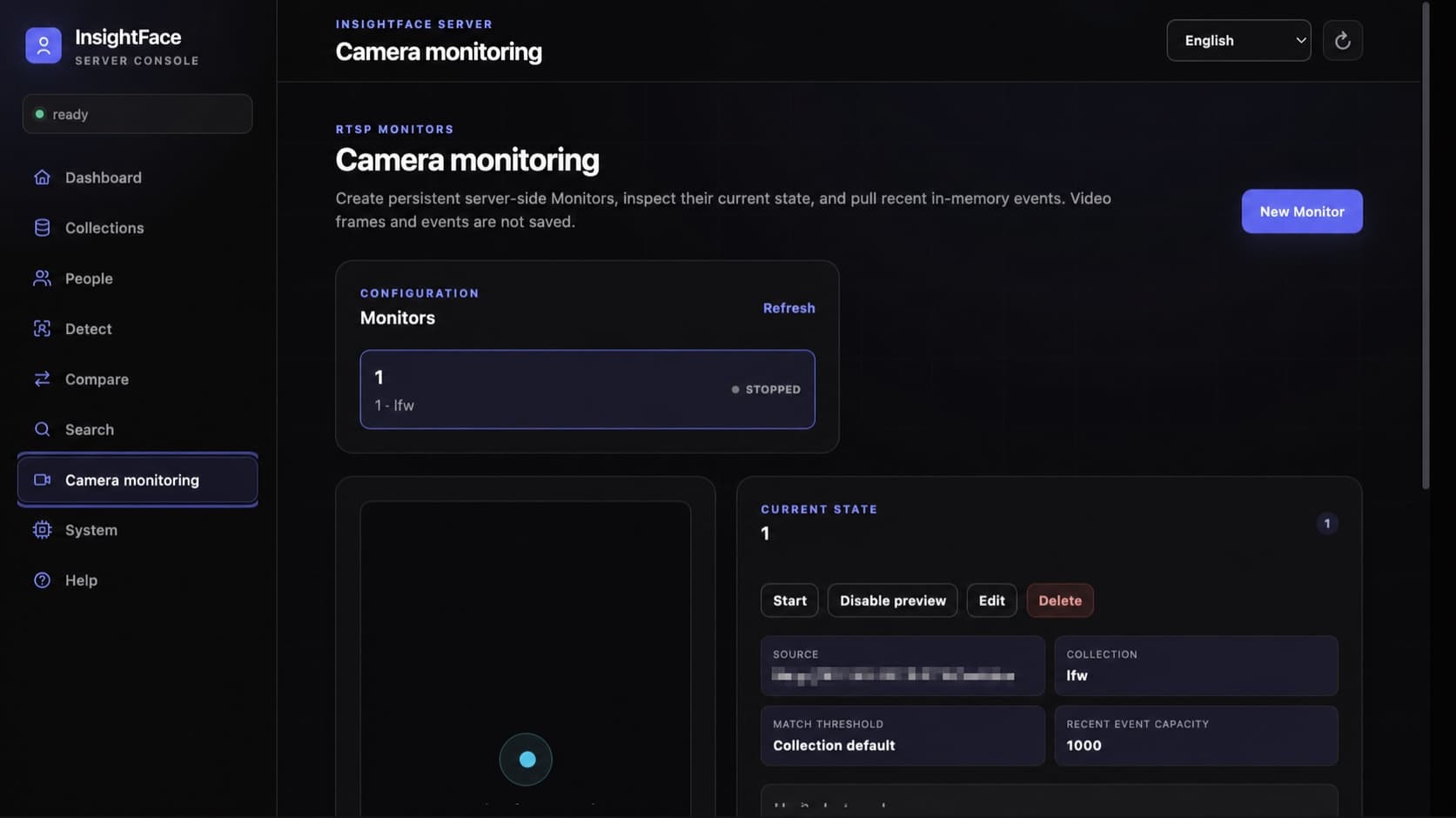
Monitor는 설정이 SQLite에 저장되는 server-side RTSP recognition task입니다. Enabled task는 Server 재시작 후 다시 실행되고 브라우저를 닫아도 계속 동작합니다. Decoder는 최신 frame 하나만 유지하므로 inference가 느리면 오래된 frame을 쌓지 않고 실제 처리 빈도를 낮춥니다. match_threshold: null은 Collection threshold를 상속합니다.
Preview는 의도적으로 기본 비활성화되어 있으며 recognition은 preview 없이도 동작합니다. 활성화하면 /preview.mjpeg가 annotation 없는 raw JPEG frame을 보내고 client가 /state로 box를 그립니다. API key를 preview URL에 넣으면 안 됩니다. Opaque cursor로 /events를 polling해 enter, exit, error, recovery events를 받고 truncated와 stream_reset을 명시적으로 처리하세요.
- RTSP credentials는 /data 아래에 AES-GCM으로 암호화되며 API는 redacted source만 반환합니다.
- Video frame은 절대 저장되지 않습니다. 최근 events는 제한된 in-memory ring에만 있으며 process 재시작 시 사라집니다.
- Monitor 관리는 신뢰하는 operator에게만 허용하세요. 첫 단계는 역할 구분 없는 단일 API key이며 tenant-level authorization이 아닙니다.
{
  "id": "front-gate",
  "name": "Front gate",
  "description": "Main entrance",
  "enabled": true,
  "source": {
    "type": "rtsp",
    "url": "rtsp://viewer:secret@camera.example/live"
  },
  "collection_id": "employees",
  "inference_fps": 2.0,
  "match_threshold": null,
  "event_buffer_size": 1000,
  "event_policy": {
    "confirm_frames": 3,
    "absence_timeout_seconds": 3.0,
    "cooldown_seconds": 10.0,
    "emit_unknown": true
  },
  "preview_enabled": false
}curl -sS "${BASE_URL}/v1/monitors" -H "${AUTH_HEADER}" \
-H 'Content-Type: application/json' \
-d @monitor.json
curl -sS "${BASE_URL}/v1/monitors/front-gate/state" \
-H "${AUTH_HEADER}"
curl -sS "${BASE_URL}/v1/monitors/front-gate/events?limit=100" \
-H "${AUTH_HEADER}"8. 데이터, 네트워크, 백업, 모델 권리 보호
/data, 모델, server/config를 영구 보관하세요. 쓰기 중지 상태에서 SQLite와 얼굴 크롭을 함께 백업하거나 SQLite에 안전한 스냅샷을 사용하세요. 생체정보로 보호하고 네트워크 공개 전에 API 키 인증과 HTTPS를 활성화하세요.
Server source와 Python SDK는 MIT 라이선스지만 모델은 명시적으로 그 범위에 포함되지 않습니다. Container image에는 모델이 없습니다. Installer는 model license를 표시하고 verify는 package identity, signed license, validity, 현재 authorization을 검사합니다. buffalo_l을 포함한 공개 InsightFace model package는 별도 상업 라이선스가 없으면 일반적으로 비상업 학술 연구에만 허용됩니다.
두 컨테이너는 root(0:0)로 실행되며 쓰기 가능한 단일 /models 마운트와 설정 디렉터리를 사용합니다. 모델 디렉터리와 addons/는 필요할 때 자동 생성됩니다. 호스트 UID/GID나 수동 권한 설정이 필요하지 않습니다. 컨테이너 루트 파일시스템은 계속 읽기 전용입니다.
- API key는 hash로 저장됩니다. 이후 시작에서 INSIGHTFACE_API_KEY를 바꾸면 해당 data volume의 active key가 의도적으로 rotation됩니다.
- docker compose down은 -v 없이 사용하세요. -v는 named data volume을 영구 삭제합니다.
- 운영 identity를 처리하기 전에 consent, retention, deletion, incident response, authorized-use policy를 정하세요.
docker compose -f server/deploy/compose.cpu.yml \
  run --rm models install buffalo_l --accept-license
docker compose -f server/deploy/compose.cpu.yml \
  run --rm models verify buffalo_l