InsightFace Server REST API と Python SDK を統合
REST API または Python SDK で Collection 作成、ID 登録、厳密な 1:N 検索、安全な再試行、永続 RTSP 監視までを実装します。
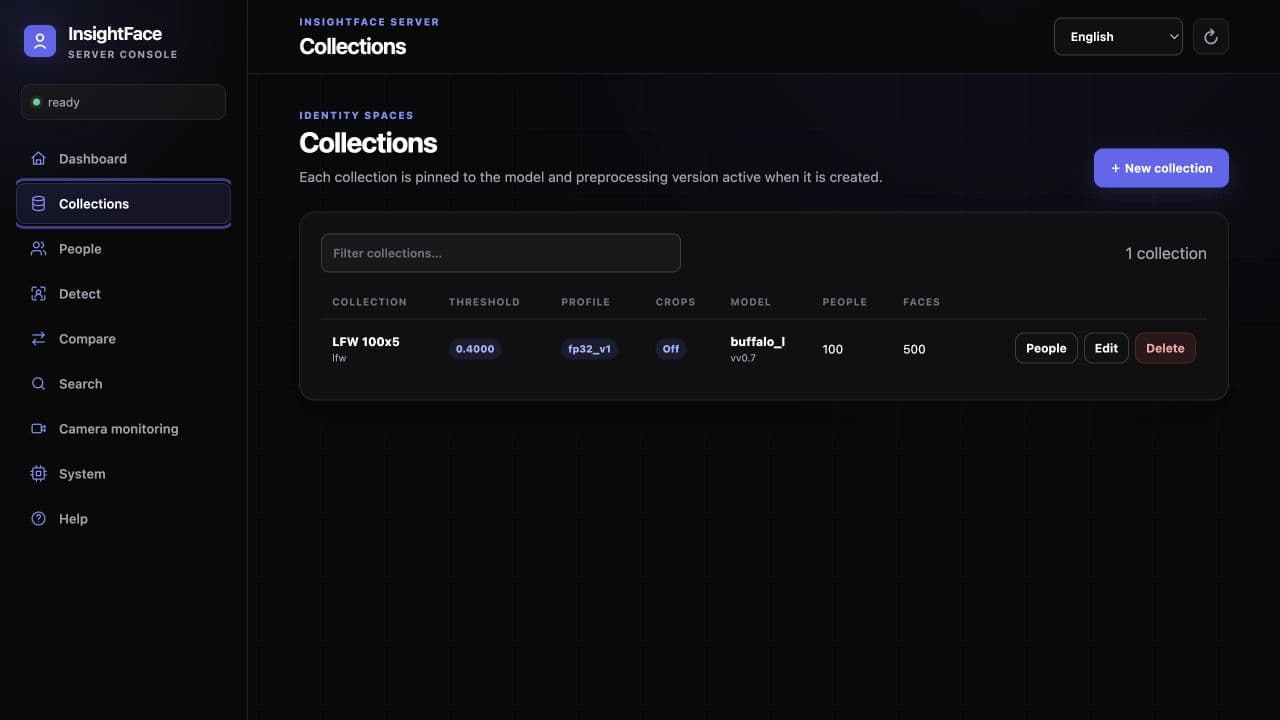
このガイドで作るもの
InsightFace Server はセルフホスト型の顔分析・顔認識サービスです。Web UI、バージョン付き /v1 REST API、軽量 Python SDK は、同じ Collection、Person、FaceSample、永続カメラ Monitor を操作します。
本ガイドでは API 境界から一連の統合を完成させます。認証と readiness の確認、Collection の作成、Person の登録と検索、ステートレスな Detect と Compare、RTSP Monitor の接続までを扱い、隔離された評価環境の外で重要になる再試行、生体データ、モデルライセンス、ネットワーク制御も説明します。
始める前に
- http://127.0.0.1:18097 で稼働する CPU Server、または設定済み CUDA Server(同梱 CUDA 例は 18098 番ポート)。
- 適切な同意の下で取得した、鮮明な顔を含む JPEG、PNG、WebP、BMP 画像。圧縮画像の既定上限は 10 MiB です。
- 認証を有効にした場合の API key、curl を実行できる shell、任意の SDK 手順に使う Python 3。
- ライセンス確認済みの model package。InsightFace の公開 pretrained model は、別途商用ライセンスがない限り非商用研究用途に限定されます。
1. 認証状態とレスポンス契約を確認する
最初に GET /v1/health を呼び出します。この endpoint は常に公開され、readiness と auth_enabled の両方を返します。auth_enabled が true の場合、その他すべての endpoint に Authorization: Bearer <api_key> が必要です。認証が無効なら Authorization header は完全に省略し、空の header を送ってはいけません。最初の command block が正しい無認証形式、次が認証済み deployment 用です。
API は snake_case JSON を使い、画像は multipart/form-data で受け取ります。全レスポンスに x-request-id UUID header があり、JSON body では request_id として再掲されます。検出・品質 signal は 0.0–1.0 ですが、認識 similarity は [-1.0, 1.0] の raw cosine であり、確率ではありません。threshold は閉区間 [0.0, 1.0]、既定値 0.4 で、similarity >= threshold が match です。
- 成功した DELETE は body なしの HTTP 204 です。
- 顔がない Detect は正常な空結果になり、Search の該当なしは正常な matches: [] です。
- OpenAPI は /openapi.json、同一 origin の interactive viewer は /docs にあります。
BASE_URL=http://127.0.0.1:18097
curl -fsS "${BASE_URL}/v1/health"
curl -sS "${BASE_URL}/v1/system"export INSIGHTFACE_API_KEY='replace-with-a-long-random-secret'
BASE_URL=http://127.0.0.1:18097
AUTH_HEADER="Authorization: Bearer ${INSIGHTFACE_API_KEY}"
curl -fsS "${BASE_URL}/v1/health"
curl -sS "${BASE_URL}/v1/system" -H "${AUTH_HEADER}"2. Collection を作成して契約を固定する
Collection は認識モデル、bundle digest、embedding 次元、前処理、検出、検索設定を固定します。応答は model_id を使い、model_version は返しません。互換性確認と信頼済み外部登録には返された embedding_contract_id をそのまま使い、独自に生成しないでください。
まず threshold 0.4 から始め、代表的な validation data で調整します。Collection response は detection_revision と解決済み search setting を公開します。後の detection-profile 変更は新規 request にのみ作用し、既存 FaceSample は再抽出されません。各 search profile は flat exhaustive search で、低精度 profile は FP32 cosine を近似しますが ANN index ではありません。
- 全体の既定 search profile は fp32_v1。fp16_v1 は CUDA 専用で、BF16 は CPU capability または SM80+ CUDA に依存します。
- 既定 capacity は 100,000 live rows、max_faces_per_person は 20。実際の memory と retention budget から決めます。
- Face crop 保存は既定で無効です。有効時も保存するのは 112×112 bounding-box JPEG crop で、original upload や aligned recognition input ではありません。
curl -sS "${BASE_URL}/v1/collections" -H "${AUTH_HEADER}" \
  -H 'Content-Type: application/json' \
  -d '{"id":"employees","name":"Employees","threshold":0.4}'
3. Person を登録して検索する
Enrollment は multipart で、1 request に複数画像を含められます。review_mode=off は Collection の face-selection strategy を使い、standard は usable face がちょうど1つであることと size、confidence、quality、pose を確認し、strict はさらに within-person と outside-person の similarity を比較します。batch は HTTP 201 で部分成功するため、faces と rejected_images の両方を必ず確認します。
Search は Collection profile で query face を1つ選び、全 live FaceSample と比較し、Person ごとに最も高い sample score を採用します。effective threshold 以上だけを similarity 降順で返します。動作確認には enrollment と別の画像を使ってください。
- usable query face がなければ 422 face_not_found。有効な query でも threshold 以上がなければ matches: [] です。
- accepted sample は成功レスポンス前に SQLite へ commit され、active in-memory index に追加されます。
- external_trusted にも paired image と正確な embedding_contract_id が必要です。vector は有限・正しい次元・非ゼロで、L2 norm が 1.0 ± 0.0002 内でなければなりません。
curl -sS "${BASE_URL}/v1/collections/employees/persons" \
  -H "${AUTH_HEADER}" \
  -F 'id=employee-001' \
  -F 'name=Alice' \
  -F 'external_id=HR-1001' \
  -F 'metadata={"department":"sales"}' \
  -F 'review_mode=standard' \
  -F 'images=@alice1.jpg' \
-F 'images=@alice2.jpg'curl -sS "${BASE_URL}/v1/collections/employees/search" \
-H "${AUTH_HEADER}" \
-F 'image=@alice-query.jpg' \
-F 'limit=5'4. ステートレスな Detect と Compare を使う
Detect は usable face を面積降順で返し、pixel/normalized box、5 landmarks、detector confidence、local quality signal を含みます。embedding は返さず、データも保存しません。immutable system profile ではなく Collection の detection profile を使う場合は collection_id を渡します。
Compare は source と target からそれぞれ1顔を選び、raw cosine similarity を計算し、effective threshold に基づく matched を返します。similarity は負にもなり得るため、confidence percentage として表示してはいけません。どちらかに usable face がなければ 422 face_not_found です。
- JPEG、PNG、WebP、BMP に対応します。推論前に EXIF の向きを適用します。max_faces は 1–100 です。
- whole-request の既定上限は 64 MiB、decoded image は 4,000 万 pixel です。
- Detect、Compare、enrollment、Search、embeddings、RTSP recognition は process-wide inference concurrency budget を共有します。
curl -sS "${BASE_URL}/v1/detect" \
  -H "${AUTH_HEADER}" \
  -F 'image=@group.jpg' \
  -F 'max_faces=10' \
-F 'collection_id=employees'curl -sS "${BASE_URL}/v1/compare" \
-H "${AUTH_HEADER}" \
-F 'source=@source.jpg' \
-F 'target=@target.jpg' \
-F 'threshold=0.4'5. 軽量 Python SDK を使う
client はこの checkout から直接インストールします。httpx ベースで inference runtime を含まず、画像 path、bytes、binary file-like object を受け取れます。既定 timeout は 65 秒で、Server の 60 秒 request deadline よりわずかに長く設定されています。
例は user guide の CPU address、18097 番ポートと認証済み Server を使います。認証が無効なら api_key を付けず Client("http://localhost:18097") を構築し、Authorization header を送信しないでください。同じ client に create_monitor、update_monitor、monitor_state、cursor-based monitor_events もあります。
- 意図的に早く fail させる場合以外は、client timeout を Server の request timeout より長くします。
- Detect / Compare で Collection detection profile が必要なら collection= を渡します。
- context manager または close を使い、connection pool を解放します。
python -m pip install ./server/sdk/pythonfrom insightface_server import Client
# Authenticated deployment. When authentication is disabled, omit api_key:
# with Client("http://localhost:18097") as client:
with Client("http://localhost:18097", api_key="your-key") as client:
client.create_collection(
collection_id="employees",
name="Employees",
threshold=0.4,
)
client.add_person(
"employees",
person_id="employee-001",
name="Alice",
images=["alice1.jpg", "alice2.jpg"],
review_mode="standard",
)
faces = client.detect("group.jpg", max_faces=10, collection="employees")
comparison = client.compare(
"source.jpg", "target.jpg", threshold=0.4, collection="employees"
)
matches = client.search("employees", "alice-query.jpg", limit=5)
print(faces.faces)
print(comparison.similarity, comparison.matched)
print(matches.matches)6. 生体データを重複登録しないエラー処理と再試行
Error は error.code、error.message、任意の details、request_id を持つ共通 JSON envelope です。代表的には 400 が invalid parameter、401 が key 不足/不正、404 が resource 不在、409 が state/model conflict、413 が size limit、422 が invalid image/usable face 不在、500 が unexpected error、503 が timeout または runtime/index unavailable です。
GET は安全に再試行できます。429 と一時的 503 は、回数と上限を設けた exponential backoff + jitter で再試行し、validation 4xx は request を直します。transport failure 後の Person/FaceSample creation は結果が曖昧です。まず client が指定した resource ID を読み取ってください。registration の 503 details に write_committed: true がある場合、SQLite への write は完了しています。盲目的に再試行せず Person を読んでから判断します。
ライブネス有効時、Detect は顔ごとの結果を返します。normal で Compare・Search が拒否されると HTTP 422 liveness_fake または liveness_input_rejected と error.details.liveness を返し、Compare は side も返します。正常な検索の空結果とは異なります。実行障害は両モードで HTTP 503 liveness_unavailable になります。
status、is_live、live_score を参照します。input_rejected のみ英語の reason が付きます。判定には status と is_live を使ってください。未実行時は liveness を省略します。登録は既定で検査を省略し、liveness_on_registration=true で有効化します。バッチは一部だけ成功する場合があります。
- x-request-id、endpoint、status、安全な timing は記録しますが、画像、embedding、API key、RTSP credential は記録しません。
- DELETE は current state を確認してから再試行します。
- pagination/event cursor は opaque です。同じ endpoint/filter でそのまま再利用し、解析・生成してはいけません。
7. 永続 RTSP Monitor を追加する
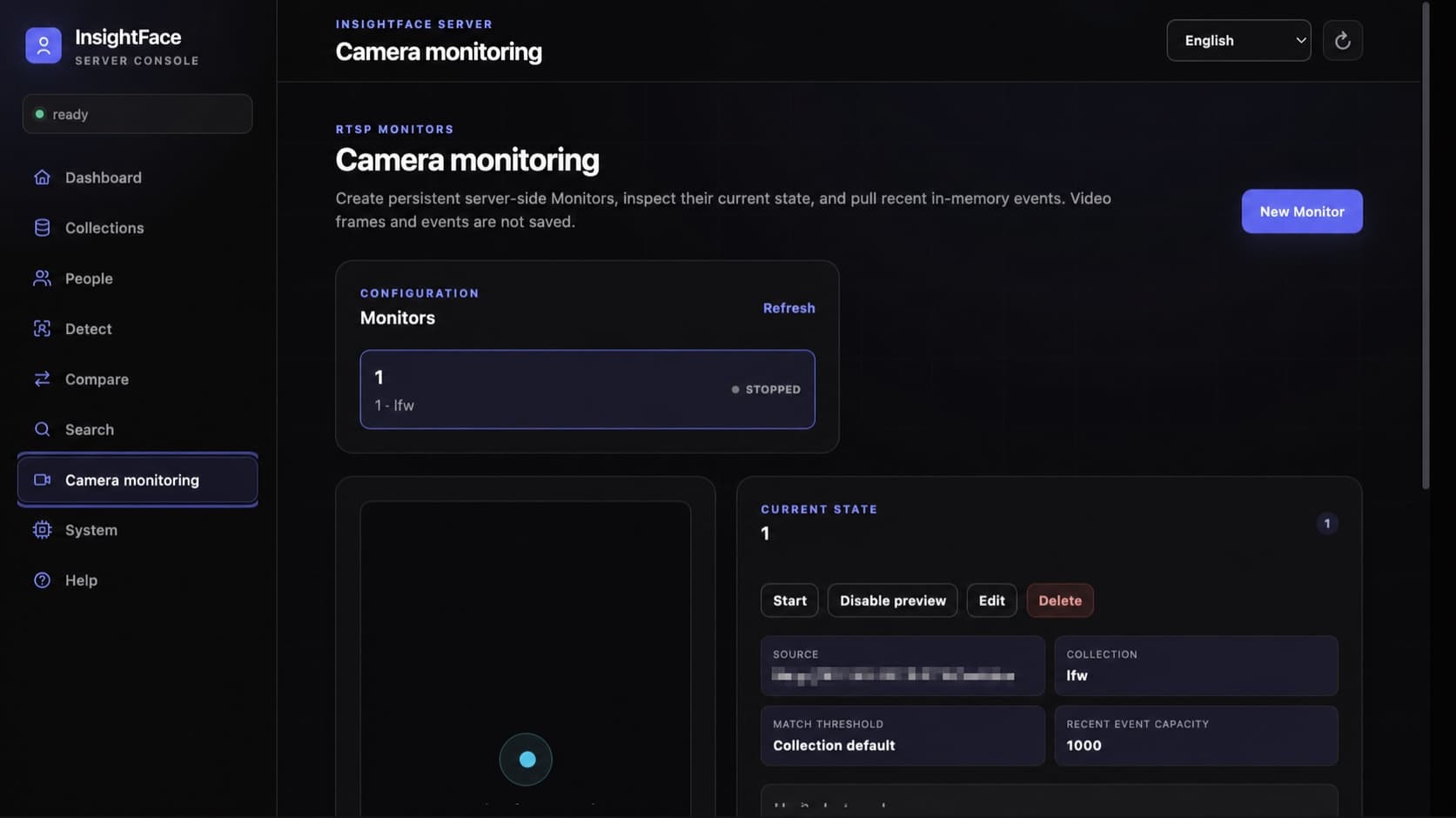
Monitor は設定を SQLite に保存する server-side RTSP recognition task です。enabled task は Server restart 後に復帰し、browser を閉じても動作します。decoder は newest frame だけを保持するため、推論が遅い場合は古い frame を溜めず effective rate を下げます。match_threshold: null は Collection threshold の継承です。
Preview は意図的に既定無効で、認識は preview なしでも続きます。有効時の /preview.mjpeg は annotation のない raw JPEG frame を送り、client が /state から box を描きます。API key を preview URL に入れてはいけません。opaque cursor で /events を poll し、enter/exit/error/recovery event と truncated/stream_reset を処理します。
- RTSP credential は /data 配下で AES-GCM 暗号化され、API では redacted source だけを返します。
- Video frame は保存されません。recent event は bounded in-memory ring のみで、process restart 時に消えます。
- Monitor 管理は trusted operator に限定します。phase one は権限分離のない単一 API key で、tenant-level authorization ではありません。
{
  "id": "front-gate",
  "name": "Front gate",
  "description": "Main entrance",
  "enabled": true,
  "source": {
    "type": "rtsp",
    "url": "rtsp://viewer:secret@camera.example/live"
  },
  "collection_id": "employees",
  "inference_fps": 2.0,
  "match_threshold": null,
  "event_buffer_size": 1000,
  "event_policy": {
    "confirm_frames": 3,
    "absence_timeout_seconds": 3.0,
    "cooldown_seconds": 10.0,
    "emit_unknown": true
  },
  "preview_enabled": false
}curl -sS "${BASE_URL}/v1/monitors" -H "${AUTH_HEADER}" \
-H 'Content-Type: application/json' \
-d @monitor.json
curl -sS "${BASE_URL}/v1/monitors/front-gate/state" \
-H "${AUTH_HEADER}"
curl -sS "${BASE_URL}/v1/monitors/front-gate/events?limit=100" \
-H "${AUTH_HEADER}"8. データ、ネットワーク、バックアップ、モデル権利を守る
/data、モデル、server/config を永続化します。書き込み停止中に SQLite と顔画像を一緒にバックアップするか、安全なスナップショットを使ってください。生体情報として保護し、ネットワーク公開前に API キー認証と HTTPS を有効にします。
Server source と Python SDK は MIT license ですが、model は明示的にその対象外です。Container image に model は含まれません。installer は model license を表示し、verify は package identity、signed license、validity date、current authorization を検証します。buffalo_l を含む公開 InsightFace model package は、別の commercial license がない限り原則として non-commercial academic research 専用です。code が入手できることや download 成功は商用配備の許可ではありません。
両コンテナは root(0:0)で動作し、単一の書き込み可能な /models と設定ディレクトリを使います。モデルルートと必要な addons/ は自動作成され、ホストの UID/GID や権限設定は不要です。コンテナのルートファイルシステムは読み取り専用です。
- API key は hash で保存され、後の起動で INSIGHTFACE_API_KEY を変えると、その data volume の active key が意図的に rotation されます。
- docker compose down は -v なしで使います。-v は named data volume を永久削除します。
- production identity を処理する前に consent、retention、deletion、incident response、authorized-use policy を定めます。
docker compose -f server/deploy/compose.cpu.yml \
  run --rm models install buffalo_l --accept-license
docker compose -f server/deploy/compose.cpu.yml \
  run --rm models verify buffalo_l