Solutions / Live streaming professionnel
InsightFace Live Identity
Exécutez localement une transformation d’identité IA autorisée en temps réel pour le live streaming professionnel et les flux de production virtuelle.
Streaming professionnel
Conçu pour le live streaming professionnel
InsightFace Live Identity est conçu pour les flux de production live examinés et de niveau organisation, lorsque les équipes ont besoin d’une transformation d’identité à faible latence sans inférence vidéo hébergée.
Équipes et flux de travail
Adapté aux flux de production
Cas d’usage
Vidéo d’exemple de flux
Cette vidéo présente un exemple de flux avec InsightFace Live Identity. Tout flou visible dans la vidéo a été ajouté en post-production pour la démo et ne fait pas partie du rendu original du produit. Utilisez le bouton plein écran du lecteur vidéo pour l’agrandir.
Modèle central
Propulsé par INSwapper Studio Live
INSwapper Studio Live est un modèle d’identité temps réel de niveau studio, optimisé pour l’inférence locale sur GPU NVIDIA. Comparé aux modèles live légers, il offre une qualité visuelle et une stabilité temporelle supérieures tout en maintenant les performances temps réel nécessaires aux configurations professionnelles de streaming.
Performances
Performance temps réel sur GPU NVIDIA modernes
InsightFace Live Identity est optimisé pour l’inférence locale à haut débit sur GPU NVIDIA. Le système peut atteindre jusqu’à 130 FPS sur un GPU NVIDIA RTX 5070, et les tests internes ont également dépassé 70 FPS sur une configuration de classe NVIDIA RTX 4050 Laptop GPU.
Jusqu’à 130 FPS sur GPU RTX 5070.
Plus de 70 FPS sur du matériel de classe RTX 4050 Laptop GPU.
Conçu pour le streaming professionnel temps réel à 30/60 FPS.
L’inférence GPU locale évite la latence de l’inférence vidéo hébergée.
Les performances dépendent du modèle de GPU, du pilote, de la résolution d’entrée et des options de sortie sélectionnées.
Architecture technique
Inférence locale, autorisation cloud
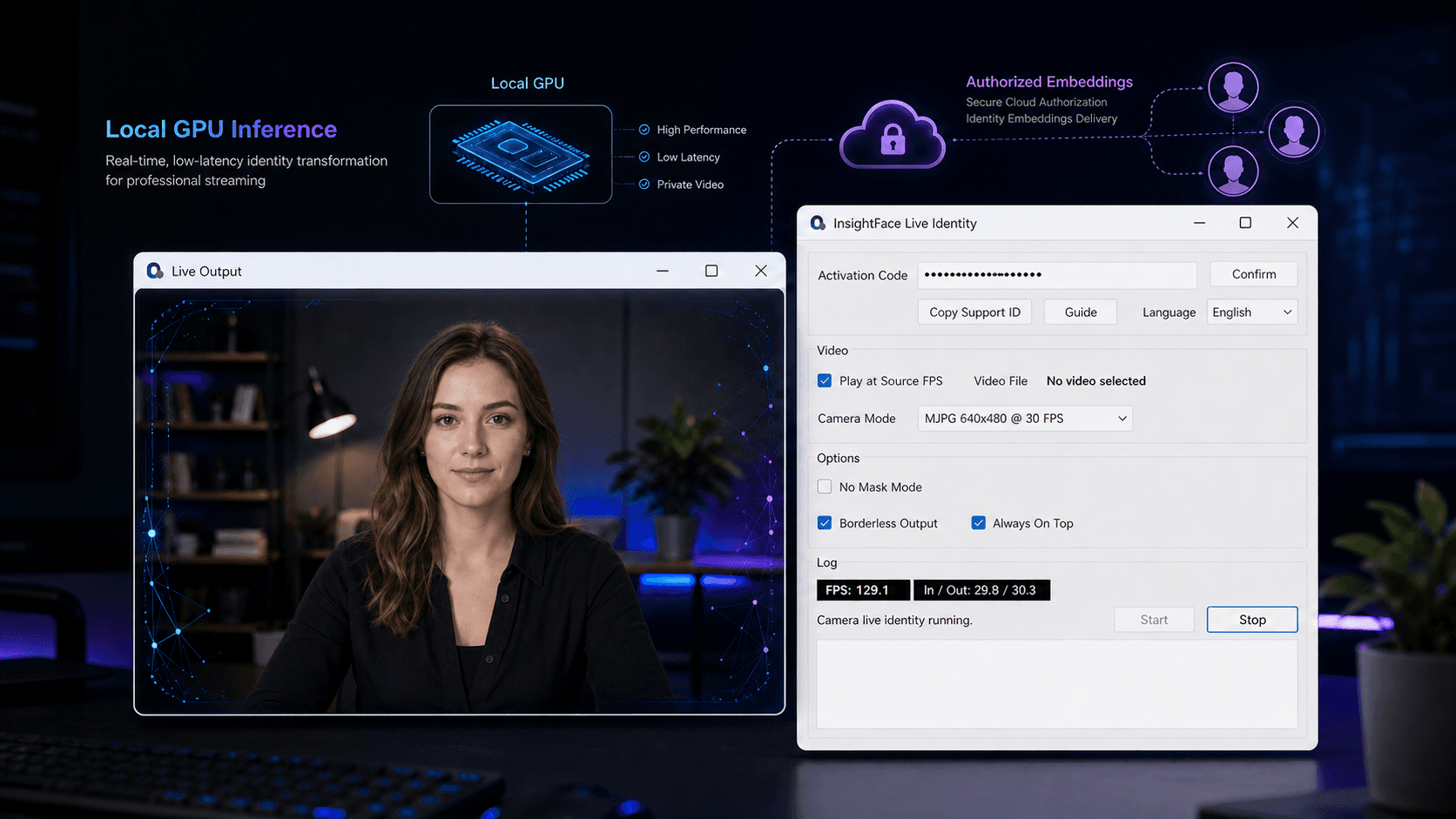
Le pipeline de transformation live s’exécute sur la station du streamer, tandis que la validation d’activation et la livraison des vecteurs d’identité autorisés sont gérées par les services cloud.
Installer l’application de bureau Windows
Le client déploie l’environnement d’exécution de bureau InsightFace Live Identity sur une station de travail Windows compatible avec GPU NVIDIA.
Saisir le code d’activation
L’utilisateur saisit un code d’activation afin de valider l’organisation licenciée, la machine, la version du modèle et l’état d’autorisation.
Sélectionner une identité autorisée
Les vecteurs d’identité autorisés pour la version de modèle actuellement licenciée sont disponibles dans l’application.
Choisir une entrée caméra ou vidéo
Le streamer sélectionne un flux caméra live ou un fichier vidéo, puis clique sur « Démarrer (Start) » pour lancer la session.
Traiter les images localement
Les images caméra ou vidéo live sont traitées localement sur le GPU NVIDIA et affichées dans la fenêtre de sortie live.
Utiliser les services cloud pour l’autorisation
Les services cloud prennent en charge la validation d’activation et la livraison sécurisée des vecteurs d’identité autorisés.
L’inférence live s’exécute localement sur la machine du streamer, tandis que la validation d’activation et la livraison des vecteurs d’identité autorisés utilisent des services cloud.
Flux autorisé
Flux sécurisé d’identité autorisée
InsightFace Live Identity repose sur la licence organisationnelle, l’autorisation d’exécution et la livraison sécurisée de vecteurs d’identité autorisés.
Revue du cas d’usage avant autorisation commerciale.
Licence et déploiement au niveau organisation.
Code d’activation et autorisation d’exécution liée à la machine.
Vecteurs d’identité autorisés livrés de manière sécurisée depuis le cloud.
Les vecteurs d’identité autorisés sont livrés pour la version de modèle actuellement licenciée.
Conçu pour un usage professionnel autorisé et fondé sur le consentement.
Expérience produit
Un flux de bureau pour une production live contrôlée
Le flux applicatif est conçu pour les opérateurs qui ont besoin d’une configuration studio répétable et d’une fenêtre de sortie intégrable aux outils de production existants.
Contrôles opérateur
Saisir le code d’activation et confirmer.
Sélectionner une identité autorisée.
Choisir Caméra ou Fichier vidéo.
Les contrôles optionnels incluent la stabilisation du visage, la stabilisation de sortie, la sortie sans bordure et le centrage à 70%.
Cliquer sur « Démarrer (Start) » pour ouvrir la fenêtre de sortie live ; cliquer sur « Arrêter (Stop) » pour terminer la session.
Déploiement
Exigences de déploiement
Le périmètre de déploiement est défini avec le client pendant l’autorisation au niveau organisation.
Licence organisation
Licence commerciale au niveau organisation
InsightFace Live Identity est actuellement proposé en licence commerciale au niveau organisation, notamment pour les entreprises, studios, agences, équipes de streaming, équipes de production virtuelle et autres organisations professionnelles. Les licences individuelles grand public ne sont pas disponibles à ce stade.
Questions fréquentes
InsightFace Live Identity est-il disponible pour les utilisateurs individuels ?
Pas à ce stade. InsightFace Live Identity est actuellement priorisé pour l’autorisation commerciale au niveau organisation, notamment les entreprises, studios, agences et équipes professionnelles de streaming.
Quel matériel est requis ?
Une station de travail Windows avec un GPU NVIDIA compatible. Les tests internes ont atteint jusqu’à 130 FPS sur un GPU de classe RTX 5070, mais les performances réelles dépendent de la configuration de déploiement.
Le flux vidéo live est-il envoyé au cloud pour l’inférence ?
Aucune inférence vidéo hébergée n’est requise pour le flux de transformation live. Les images live sont traitées localement sur le GPU du streamer. Les services cloud sont utilisés pour la validation d’activation et la livraison sécurisée des vecteurs d’identité autorisés.
Utilisation responsable
Transformation d’identité responsable et revue
L’accès commercial est régi par le déploiement prévu, la licence organisationnelle, l’autorisation d’exécution et le contexte opérationnel du client. Le produit est conçu pour un usage professionnel autorisé et fondé sur le consentement.
Scénarios autorisés uniquement
InsightFace Live Identity est destiné aux organisations licenciées utilisant des vecteurs d’identité autorisés dans des flux de travail professionnels. L’autorisation peut être limitée, révisée ou révoquée si l’usage s’écarte du périmètre convenu.
Non pris en charge
Discuter du déploiement Live Identity
Partagez votre organisation, votre contexte de production, l’environnement GPU cible et le flux de live streaming attendu.